- Topic ID: id_15460650
- Version: 2.0
- Date: Nov 8, 2018 1:36:24 AM
Informational Support Procedures
1 Symbols
2 ESD Grounding Points
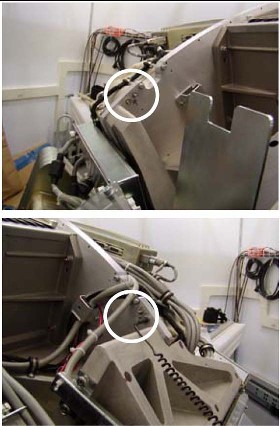
The gantry has defined ESD attachment points that allow easy attachment for banana clip and alligator clip style connections. There are points on the stationary frame on each side of the gantry and rotating assembly behind the DAS plate. The stationary frame locations should always be used if the length of your ESD strap is sufficient.
Figure 1. Gantry Right Side Clip Example
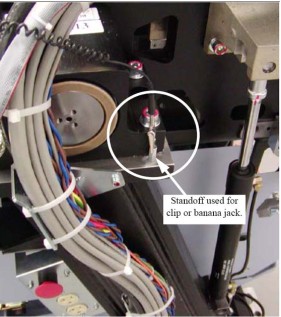
Figure 2. Gantry Right Side Banana Jack Example
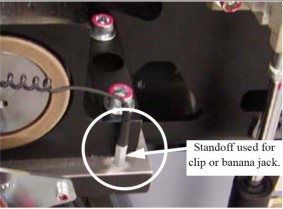
Figure 3. Gantry Left Side Connection
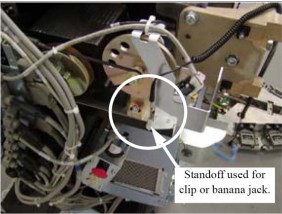
Figure 4. Rear of DAS Plate ESD Connection Points
3 Manually Mount/Unmount a CD
3.1 Introduction
This appendix contains the following procedures that may be useful during a software load:
-
CDROM — Mount Process
-
CDROM — Unmount Process
3.2 Procedures
3.2.1 Preparation
-
Insert a CD into the DVD ROM drive.
-
Open a Shell window.
-
Type: su - ENTER
-
Type the password and press ENTER
3.2.2 CDROM — Manual Mount CD Process
If login was successful, continue with manually mounting the CD:
-
Type: cd /ENTER
-
Type: mount /mnt/cdromENTER
-
Type: cd /mnt/cdromENTER
-
The CD has now been mounted. To see what is on it, type:
ls /mnt/cdrom ENTER
3.2.3 CDROM — Manual Unmount CD Process
Unmount the CD in order to remove it from the drive; do this by typing the following:
-
Type: cd /ENTER
-
Type: umount /mnt/cdromENTER
-
Type: ejectENTER
-
Remove the CD from the DVD-ROM drive and close the drive.