- Topic ID: concept_arz_hbf_qkb
- Version: 3.0
- Date: Jun 15, 2020 10:59:59 PM
GT Trouble Shooting
Overview
This instruction is focused on Error Logs which is related to GT table and is considered as difficult to reach the root cause.
So some error logs which are easy to find root cause are omitted.
1 Solutions for error code
1.1 260125005 or 244633 or 260125042
“260125005 Table Communication - Watchdog timeout” or “244633 Table reports that Table Communication becomes down”, or “260125042 Communication with the Table failed” which is reported with no table-related error (260134xxx)"
- Gantry Switch panel failure → Check “TBL_DRV_ENV” on TGPU B’d. If this LED is turned on without activating Switch Panel, defective Switch Panel is suspected. (Applicable for VCT, VCT HD, and early Brightspeed)
Figure 1. “TBL_DRV_ENV” on TGPU
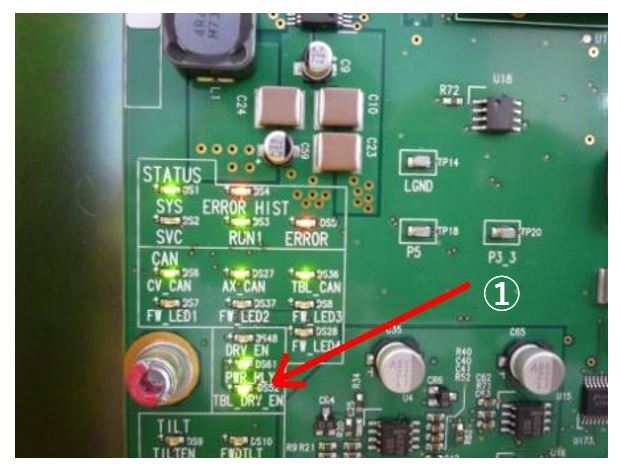
① “TBL_DRV_ENV” on TGPU - GTCB reset because of instant electric power outage → Check cables
- 24VDC cables from power supply (24VDC line’s short circuit to frame GND causes instant electric outage and GTCB reset.)
- cables to Shut-off valve and Proportional valve
1.2 260125034
“260125034 Did not reboot TCB within 20sec.”
- GTCB failure
- Table 24V DC Power Supply’s failure
- Cable between TGP and GTCB is damaged
- Contact failure at Connector
1.3 260125041 (Cradle)
“260125041 Uncommanded Table Motion with the Cradle drive.”
This error is not reported by GTCB but TGP. If cradle is moved by external force and so on after cradle positioning by table firmware, this error is reported.
In almost case, this error is generated when cradle was moved by external force.
- Heavy patient’s motion after cradle positioning → Improve patient constraint to reduce patient’s contact to table top cover
- Low tension on cradle drive belt → Belt tension adjustment
- Sticky motion of cradle linear guide (left side) or roller/rail (right side) → Cleaning & Greasing
1.4 260125041 (IMS)
“260125041 Uncommanded Table Motion with the IMS drive.”
This error is not reported by GTCB but TGP. If IMS is moved by extraction force and so on after finishing IMS positioning by table firmware, this error is reported.
- Low tension on IMS drive belt → Belt tension adjustment
- Sticky motion of IMS linear guide (left side) or roller/rail (right side) → Cleaning & Greasing
1.5 260125041 (Elevation)
“260125041 Uncommanded Table Motion with the Elevation drive.”
This error is not reported by GTCB but TGP. If table height is changed after table firmware stopped elevation, this error is reported.
1.6 260100042
“260100042 Cradle was NOT ready.” alone (without table related error) is not table failure.
- Cradle, IMS or Base (PET) could not reach the scan start position. Other table related error would be shown together.
- For cradle, collision while moving to scan start position is suspected.
- For IMS or Base (PET), check belt tension, mechanical play, and their encoder function.
1.7 Tape/Touch SW errors
GTCB reports error about “Tape/Touch SW is contacted” or “Tape/Touch SW is not present”, but Tape/Touch SW does not have problem.
- Fuse on GTCB is blown → Replace GTCB
1.8 260134602 and 260134809
"260134602 Cradle drive torque setting error" and "260134809 IMS drive torque setting error"
- Cable between the motor driver and IMS Cable Bear Assy, or cable in IMS Cable Bear Assy is damaged. → Cable replacement
- To check cable function, connecting new cable through outside of the table is effective. If no improvement, then try each part replacement.
Figure 2. Checking cable function (To motor driver)
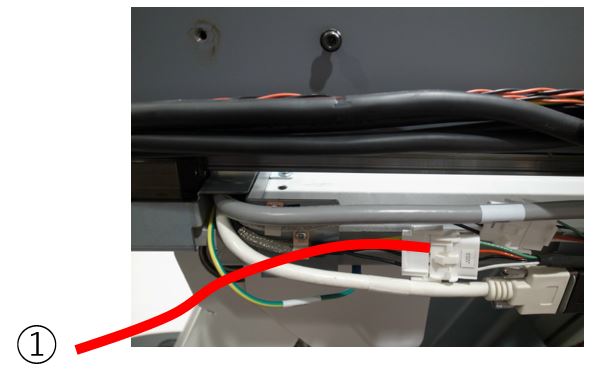
① To Motor driver
- Remove "Top Plate"
- Open the Cable Duct
- Replace the cable
Figure 3. Cable duct between the motor driver and IMS cable bear Assy
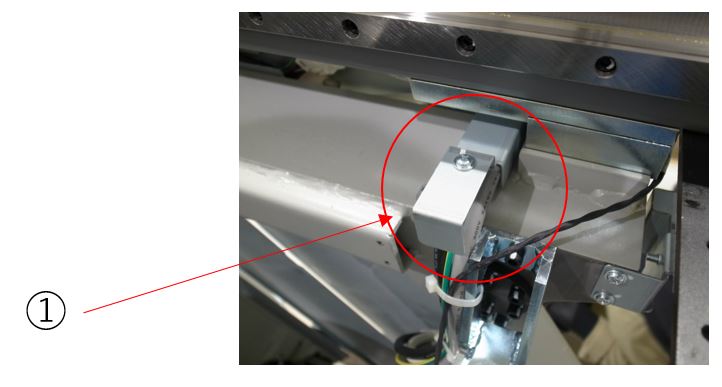
| ① | Cable duct |
1.9 260134615, 260134616, 260134617, 260134623, 260134639, 260134640, 260134813, 260112018, and so on
Figure 4. Functions related to error code
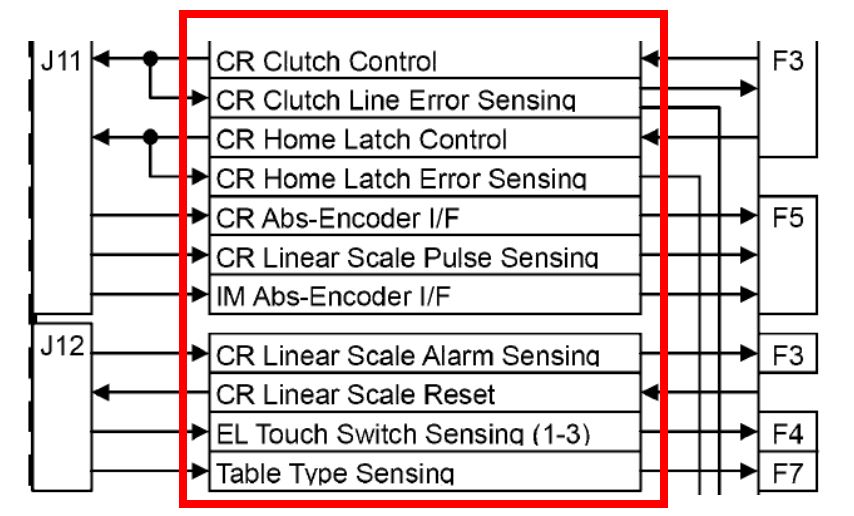
Oftenly, GTCB is reset while elevation motion and shows table-related error.
- Cable between GTCB J11/J12 and J200/201, or cable in IMS Cable Bear Assy is damaged. → Cable replacement
- To check cable function, connecting new cable through outside of the table is quick and easy. If no improvement, then try each function part replacement.
Figure 5. Checking cable function (To GTCB)
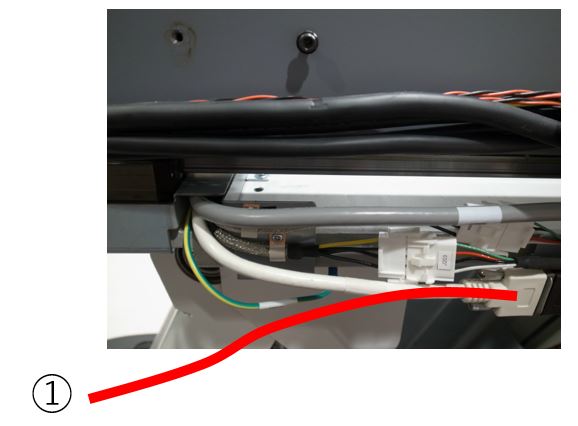
① To GTCB
- Remove "Top Plate"
- Open the Cable Duct
- Replace the cable
Figure 6. Cable duct between GTCB J11/J12 and J200/201
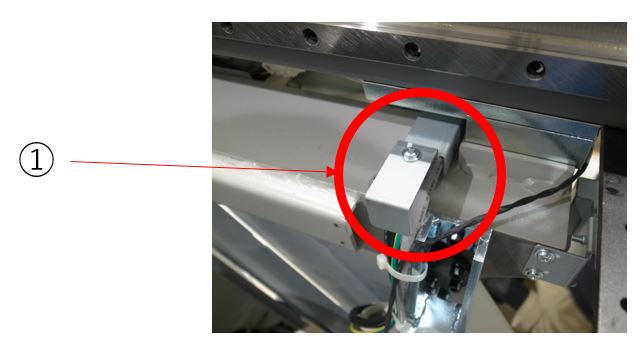
| ① | Cable Duct |
1.10 260134703
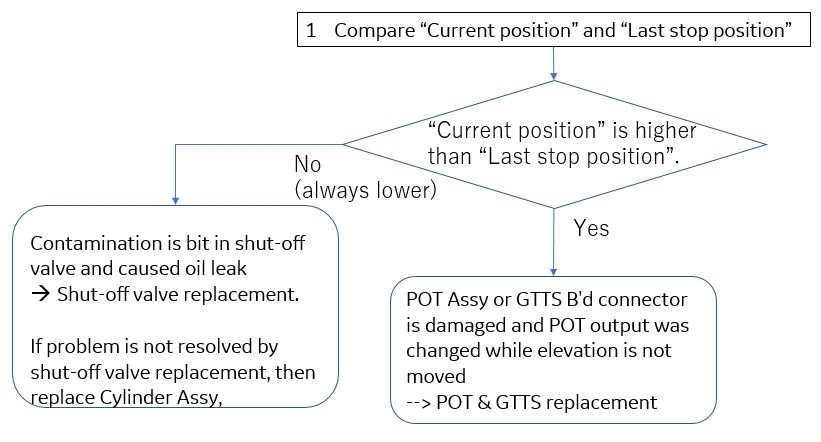
"260134703 Elevation moved without command"
Figure 7. Flowchart for "Elevation moved without command"
1.11 260134706
"260134706 Elevation could not move with motion command"
- <Up operation is not available>
- 24VDC output from GTCB J2 to inverter assy is not supplied. → Cable or GTCB replacement
- Power cable from invertor to pump is disconnected. (Motor operating noise can be heard, but table does not raise.) → Cable replacement. As for table raising method, refer to procedure.
- <Down operation is not available>
- Power to shut-off valve or proportional valve is not supplied. → Check cable, Inverter Assy, GTCB (Shut-off valve is driven by GTVS B'd in inverter assy)
- Remove plastic head
- A cap screw is found
- Rotate motor shaft in CW direction (table is lifted 0.03-0.15mm/rotation)
Figure 8. How to lift a lowered table
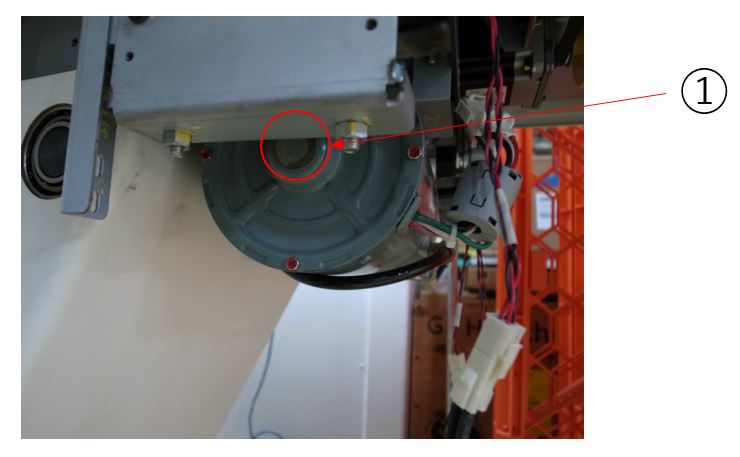
| ① | A cap screw head |
1.12 260134707
"260134707 Elevation could not stop with stop command"
- Proportional valve damage (Deceleration is delayed when button was released) → Proportional valve replacementnote:
Proportional valve design was improved in 2008, so proportional valve damage is rare now.
- POT belt tension is low → Belt tension adjustment (need to check at a several different height)
- Detect table vibration especially around lowest height only, but no impact to the customer or patient → No GTCB reset although error can be found in error log. No action is necessary.
1.13 260134727
"260134727 Elevation Up velocity is too slow"
- Oil level in pump is low → Refill oil
- Inverter failure → Inverter Assy replacement