- Topic ID: id_16157721
- Version: 4.0
- Date: Jan 20, 2020 8:34:09 PM
Touch Sensor Positioning
Prerequisites
Overview
Procedure
- Inspect the side touch sensor for position as follows:
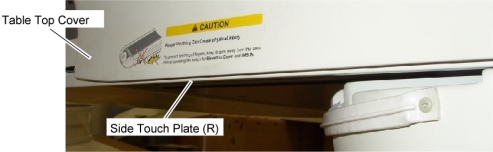
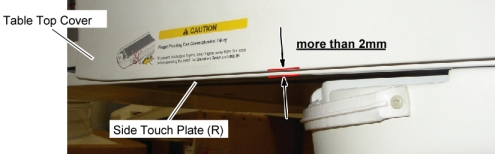
- Verify that the position of the both side touch plates are stuck
out from the bottom surface of the Table top cover more than 2mm (see
illustration below).
Figure 1. Position of the Touch Sensor Plate
- Remove the following Table covers:
-
Top Cover (Left/Right)
-
Rear Top Cover
-
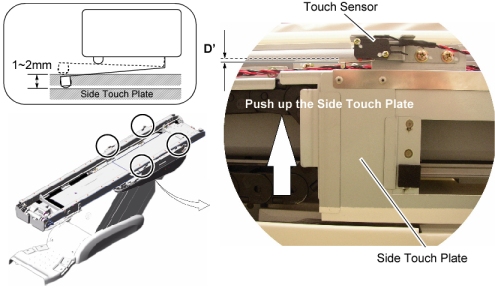
- Push up the side touch plate to activate the touch sensor, and
measure the operating distance (D’) shown in illustration blow,
then verify that the operating distance (D’) is 1mm ~ 2mm.
Figure 2. Side Touch Sensors
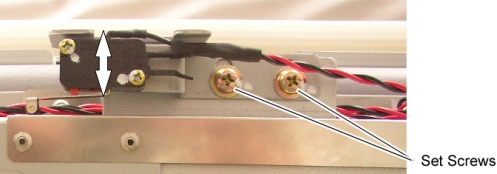
- If the operating distance (D’) is out of tolerance, adjust
the sensor position by two set screws (Torque: 2.6Nm / 1.92ft.-lbs).
Figure 3. Set Screws of Side Touch Sensor
- Check other side touch sensors as in step Step 1.c. and step Step 1.d.
- Verify that the position of the both side touch plates are stuck
out from the bottom surface of the Table top cover more than 2mm (see
illustration below).
- For GT1700: Inspect the rear touch sensor for position as follows:
- Remove the following Table Covers:
-
Top Cover (Left/Right)
-
Rear Top Cover
-
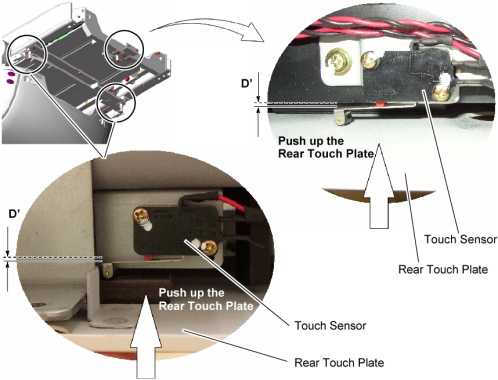
- Push up the rear touch plate to activate the touch sensor, and
measure the operating distance (D’) shown in illustration below,
then verify that the operating distance (D’) is 1mm ~ 2mm.
Figure 4. Rear Touch Sensors of GT1700
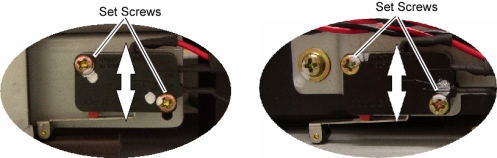
- If the operating distance (D’) is out of tolerance, adjust
the sensor position by two set screws (Torque: 0.56Nm / 0.41ft.-lbs).
Figure 5. Set Screws of Rear Touch Sensor
- Check other rear touch sensors as in step Step 2.b and step Step 2.c.
- Remove the following Table Covers:
- For GT2000 and Global PET/CT Table: Inspect the rear touch sensor
for position as follows:
- Remove the following Table covers:
-
Top cover (Left/Right)
-
Rear Top Cover
-
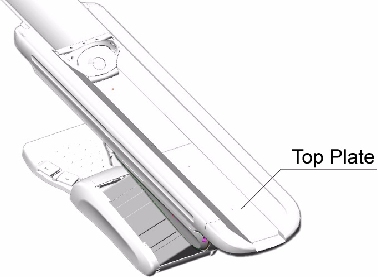
- Remove the top plate.
Figure 6. Table Top Cover
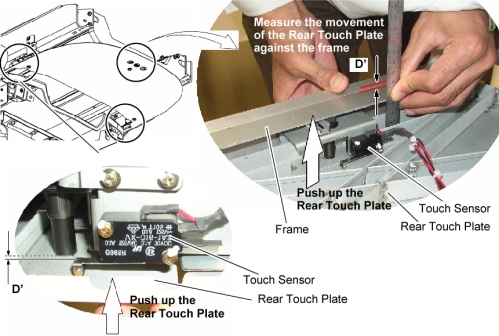
- Push up the rear touch plate to activate the touch sensor, and
measure the operating distance (D’) shown in illustration below,
then verify that the operating distance (D’) is 1mm ~ 2mm.
Figure 7. Rear Touch Sensor (GT2000 and Global PET/CT Table)
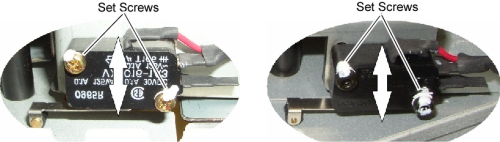
- If the operating distance (D’) is out of tolerance, adjust
the sensor position by two set screws (Torque: 0.56Nm / 0.41ft.-lbs).
Figure 8. Set Screws of Rear Touch Sensor (GT2000 and Global PET/CT Table)
- Check other rear touch sensors as in step Step 3.c and step Step 3.d.
- Remove the following Table covers:
- Re-intall the Table covers.
Finalization
- Power up the Table from the service Switch Panel in Gantry.
- Move the cradle In/Out repeatedly, and raise and lower the Table repeatedly to verify that the Table movement is operating normally.
- Push up the side touch plate, and verify that the touch sensor
is activated without being hidden behind the Table top cover.
Figure 9. Check Side Touch Sensor