- Topic ID: id_18718500
- Version: 2.0
- Date: May 26, 2022 5:26:13 AM
Top Cover Cooling Fan Replacement
Prerequisites
Overview
Procedure
- Remove gantry covers as required.
Refer to
- notice
- Turn off all three (3) switches (Axial Drive, HVDC, 120VAC) on the Service Switch Panel.
- Unplug the cable connecting the fans to the gantry.
 caution
- Remove the top gantry cover that has the fan that is being replaced.
Figure 1. Fan Assemblies
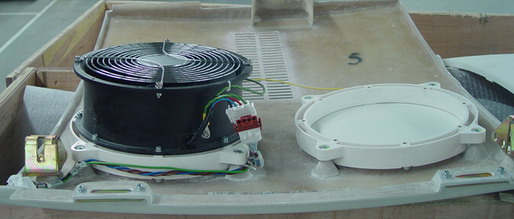
- Disconnect the cable on the fan.
- Remove the four (4) screws that mount the fan to the top cover.
- Remove the old fan.
- notice
- Reverse the above steps to install the new fan.
Be sure to secure all cables so that they lay flat on the top cover. There are cable securing items in the installation support kit that can be used to complete this task.
 |
 |
|
Finalization
- Check that fan operates normally when the system is powered.