- Topic ID: id_11038812
- Version: 3.0
- Date: Apr 9, 2020 8:50:05 PM
Slipring Transmitter (850 Mbaud) Replacement
Prerequisites
This procedure describes the Slipring Transmitter replacement.
Procedure
- Move table to its lowest elevation.
- Remove gantry covers as required.
Refer to
- notice
- Turn OFF all 3 service switches (Axial Drive, HVDC, 120VAC) on the Service Switch Panel. Follow Lockout/Tagout procedures.
- The transmitter is located on the back of the slipring. Locate it by rotating gantry.
- notice
- Remove J1 and J3 cables.
- Using a 2.5mm hex key, remove screws holding the transmitter to the
slipring.
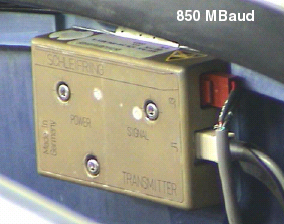
Figure 1. 850 MBaud Slipring Transmitter
- Replace transmitter.
 |
|
Finalization
- Hardware Reset
- Acquire 10 scouts: (120kV/40mA, 1000mm table movement)
- Acquire 100 axials: (120kV/80mA, 0.5 sec. Scan)
- Acquire 1 helical: (120kV/40mA, 30 sec. Scan),
- Acquire 10 axial scans: (120kV/400mA, 4 sec. Scan)
- Verify NO increase in corrected or uncorrected FEC errors.
- Reset DIP Stats: Perform the following procedure to reset cumulative
DIP Stats (shown on the Common Service Desktop Home Page):
- Open a Unix shell.
- Type: cd /usr/g/service/log
- Type: mv dip.stats dip.stats.old
- Shutdown and restart the system. This will reinitialize the dip.stats file.
- Save System State.