- Topic ID: id_18718192
- Version: 2.0
- Date: Sep 26, 2020 10:13:11 PM
Power Distribution Box Replacement
Prerequisites
Overview
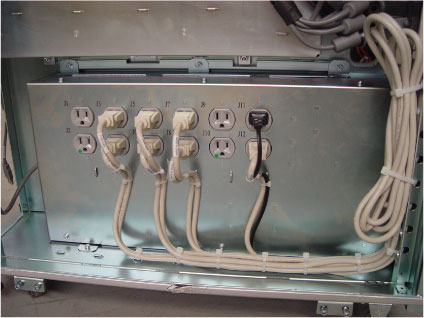
This procedure describes and illustrates the steps necessary to replace a Power Distribution Box in the left compartment of the Operator Console. The Power Distribution Box comes as an assembly.
This procedure requires major disassembly of the Console Chassis. Allow ample time and work space to perform this procedure.
Figure 1. Power Distribution Box
1 Power-Off (Shut Down) the Console
Procedure
- Select one of the following methods to power off the Operator
Console:
-
If applications are running, click the Shut Down icon and select Shut Down.
-
If applications are down, open a Unix Shell using the Toolchest. Type: {ctuser@hostname} halt. Press Enter.
The Operator Console monitor will display a ‘System Halted’ message when it is acceptable to power off the Operator Console.
-
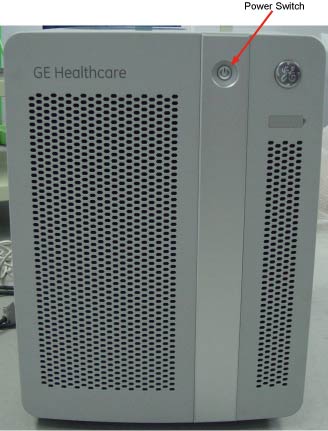
- Power OFF the Operator Console at the front panel switch. (See Figure 2.)
Figure 2. Console Power Switch
- Perform prescribed Lockout/Tagout procedure. For added protection, disconnect the Twist-N-Lock Main Power Cable from rear of console.
2 Remove Power Distribution Box Assembly
Procedure
- Remove the front and side Operator Console Covers per prescribed cover removal procedure.
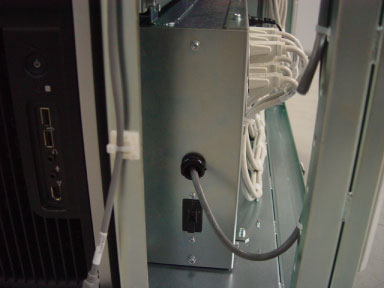
- Disconnect the Console Power Switch from the Power Distribution
Box.
Figure 3. Console Power Switch cable
- Disconnect all power cords connected to the Power Distribution Box. Confirm each cable and power cord is labelled appropriately.
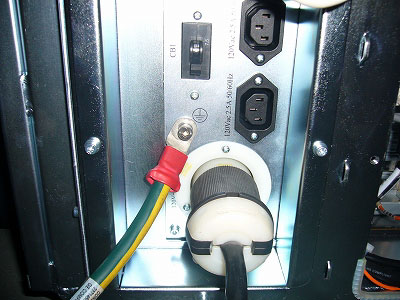
- Disconnect the Ground Cable from Rear Bulkhead Panel of console.
Confirm ground cable is labelled appropriately.
Figure 4. Ground Cable of Bulkhead
- Remove the six screws holding the Power Distribution Box to
the console chassis.
Figure 5. Power Distribution Box Removal
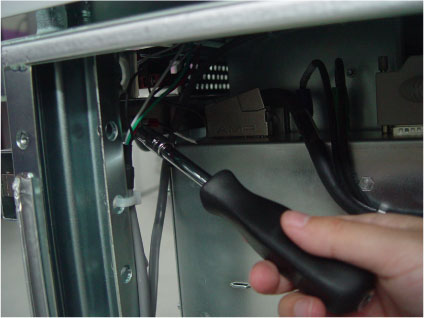
- Slide the Power Distribution Box towards the front of the console and remove the entire Power Distribution Box assembly from console.
3 Install Replacement Power Distribution Box Assembly
Procedure
- Slide replacement Power Distribution Box in left compartment of console.
- Install the Power Distribution Box to the console chassis using six screws.
- Connect the Ground cable to rear of console.
- Connect the Console Power Switch to the Power Distribution Box.
- Connect all power cords connected to the Power Distribution
Box.note:
It is important that the Power Cords be connected to their assigned outlets on the Power Distribution Box to maintain proper power load balance.
- Check that all two (2) Circuit Breakers on the Power Distribution Box are set ON.
4 Power-On the Operator Console
Procedure
- Reconnect the Main Power Cable from rear of console and remove Lockout Tagout protection applied earlier.
- Power ON the Operator Console.
5 Verify Replacement Power Distribution Box Operation
Procedure
- Visually verify the Operator Console powers up and that all
components (Computers, Monitors, Peripheral Towers, etc.) have power.
- No other verifications required.
6 Finalization
Procedure
- Make System Scanning Test to confirm proper operation.
- Reinstall Console Front and Side Covers.