- Topic ID: id_16157576
- Version: 3.0
- Date: Apr 22, 2019 12:56:23 AM
Open Console Cover Removal and Installation
Prerequisites
Overview
This procedure shall be followed when removing or installing covers on the Open Console Chassis.
Figure 1. Open Console
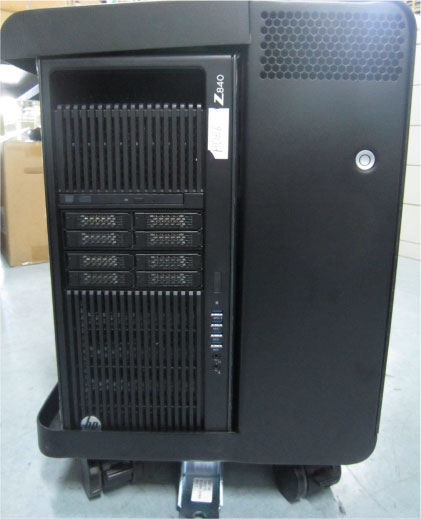
1 Top Cover
1.1 Top Cover Removal
Procedure
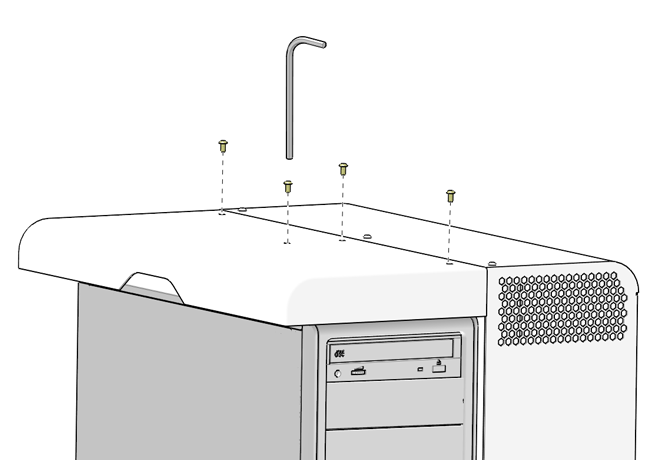
- Remove the four (4) Hexagon Button Head Screws (M4 X 8mm) from
the top cover at the top of the chassis.
Figure 2. Top Cover Mounting Screw Removal
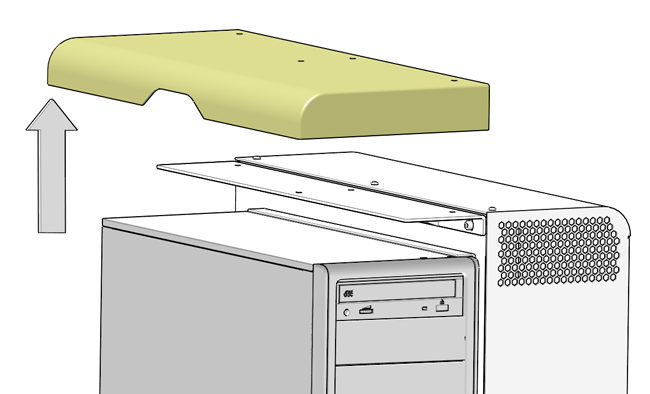
- Pull the top cover away from the chassis. Then lift upward until
it the top cover is free of the chassis and set aside.
Figure 3. Top Cover Mounting Removal
1.2 Top Cover Installation
Procedure
- Engage top cover on the Open Console chassis. Set the top cover on top of the chassis.
- Install and tighten the four (4) Hexagon Button Head Screws (M4 X 8mm) on the top cover at the rear of the chassis.
2 Side Cover
2.1 Removal Procedure
Procedure
- Remove the seven (7) Hexagon Button Head Screws (M4 X 8mm) from the Open Console side cover.
- Tilt the side cover away from the chassis. Then lift outward until it the side cover is free of the chassis and set aside.
2.2 Installation Procedure
Procedure
- Engage side cover on the Open Console chassis. Insert the bottom edge of cover into the chassis base and hinge the side cover onto the chassis.
- Install and tighten the seven (7) Hexagon Button Head Screws (M4 X 8mm) on the side cover.