- Topic ID: id_18718314
- Version: 1.0
- Date: Sep 20, 2018 2:04:32 PM
Intercom Board Replacement (True-In-One Console)
Prerequisites
Overview
This module describes the procedures used to replace the Intercom Board on True-In-One Console
After the Intercom board has been replaced and, several tests and adjustment are required:
-
Console and table speaker volume adjustment
-
Prescribed tilt function test
1 Power-Off (Shut Down) the Console
Procedure
- Select one of the following methods to Power OFF the Operator
Console:
- If Applications are up, click on the Shut Down button and select Shutdown.
The Operator Console monitor will display a 'Power Down' message when it is acceptable to power OFF the Operator Console.
- If Applications are down, open a Unix Shell. Type: halt.
- If Applications are up, click on the Shut Down button and select Shutdown.
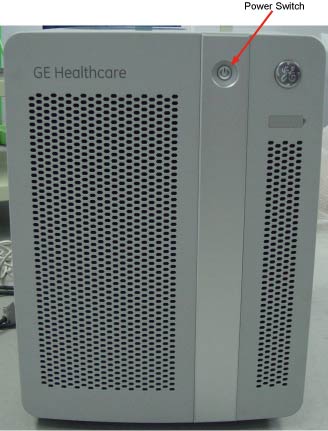
- Power OFF the console at the front panel switch.
Figure 1. Power Switch
2 Remove the Old Intercom Board
Procedure
- Remove the Operator Console covers.
Refer to
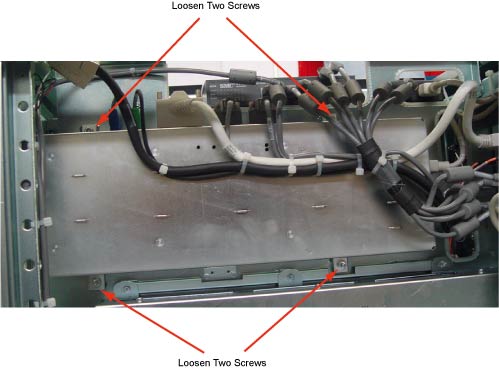
- Remove the four screws located on the front panel of Intercom
Board, which secures Intercom Board to the chassis.
Figure 2. Intercom Board Front Panel
- Visually verify proper labeling of each cable and disconnect
all cables on the panel. If necessary, add a label to each cable for
clarity.
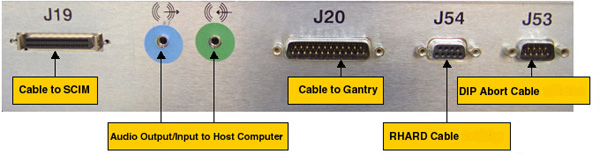
Cables to be removed: (Refer to Figure 3 below for cable connections)
-
J19: Cable to SCIM/Keyboard
-
Audio output/input cable to Host Computer, connect as per the color of the cable adapter
-
J20: Cable to gantry
-
J54: Serial RHARD cable
-
J53: Serial DIP Abort cable
-
Power cord on the rear panel
Figure 3. Cable Connection on TIO Intercom Board
-
3 Install the New Intercom Board
Procedure
- Slide the replacement Intercom Board into the Console.
- Re-Connect the cables as using Step 3 above as a
guide. At the rear panel of Intercom Board, verify the power switch
is in the “ON” position, and connect the power cord.
4 Power On the Console
Procedure
- Power ON the Operator Console.
5 Intercom Board Adjustment / Test
Procedure
- Adjust the console and table speaker volume; refer to Intercom Adjustments
- Take some scans which need to do prescribed tilt; verify the prescribed tilt function is normal.
6 Finalization
Procedure
- Install the console covers back.