- Topic ID: id_18718215
- Version: 2.0
- Date: Sep 26, 2020 10:13:13 PM
ICOM Fuse Replacement
Prerequisites
Overview
1 Power OFF (Shut Down) the Console
Procedure
- If Applications are up, click on the Shut Down button.
- Power OFF the Operator Console front switch, when instructed to “Power Down”.
2 Remove Old Fuse
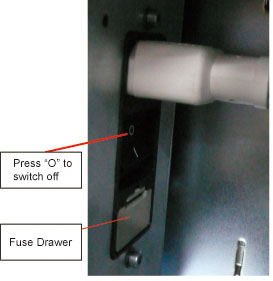
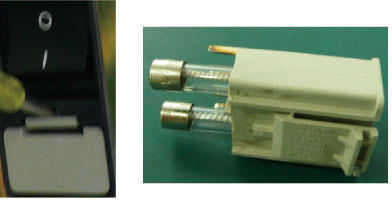
3 Install New Fuse
Procedure
- Install the new Fuse (8A 250V Time Delay Fuse) into the Fuse Drawer
- Switch on ICOM at the rear side of ICOM.
- Restore the console cover.
4 Finalization
Procedure
- Take some scans which need to do prescribed tilt.
- Verify the prescribed tilt function is normal.