- Topic ID: id_16157590
- Version: 3.0
- Date: Apr 9, 2020 8:42:26 PM
Hydraulic Tilt Motor Speed Adjustment
Prerequisites
Overview
The Tilt Speed tool is only available on systems with 06MW29.7 or later software. Systems with earlier software must use a stop watch or a watch with “seconds” indication to adjust the tilt speed.
Procedure
-
(For users with laptop and 06MW29.7 or later software) Perform the following:
- Connect laptop to console using the service cable.
- Complete laptop setup and log in.
-
(For users with 06MW29.7 or later software) Perform the following:
- Display the service desktop Diagnostics screen (from laptop or from the Console if no laptop).
- Select Left Side Troubleshooting Tool.
- Select Tilt Speed.
- Remove gantry rear base covers.
- From behind the gantry, use laptop to tilt gantry and adjust
for 1° per second motion. Tilt speed will be displayed on the
service tool. note: (For 1 user or pre-06MW29.7 software) Use a stopwatch or suitable time piece to adjust Tilt speed for one (1) degree per second motion.

- notice
note: Tilt speed will vary based upon hydraulic fluid temperature. Adjustments should be made at normal scan room temperature settings. Gantry angle is also displayed. When you are at zero (0), the service tool display should read 0.00. - From zero (0) degrees tilt, press and hold the tilt forward
button,
 until gantry display
reads S25. Observe tilt speed.
until gantry display
reads S25. Observe tilt speed. - Press and hold backward tilt button,
 until gantry display reads I25. Observe
tilt speed.
until gantry display reads I25. Observe
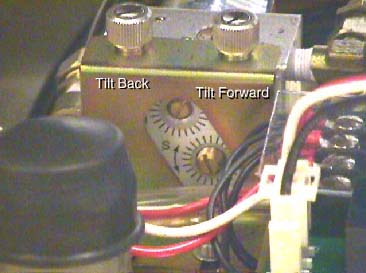
tilt speed. - Adjust forward speed control valve for one (1) degree per second motion. See Figure 1.
- Adjust backward speed control valve for one (1) degree per second motion. See Figure 1.
- Repeat steps 3 through 6 until tilt speed for both directions is correct.
- Now tilt the gantry forward to S30. Observe the S25 to S30 speed.
Do this several times. If a noticeable difference is observed, then
check the hydraulic fluid levels.note: This is a self bleeding system. Trapped air can cause slowed or limited tilt range. Exercising the full range of motion several times should purge any trapped air from the hydraulic system. Tilt Back. Tilt Forward. Tilt Forward. Tilt Back.
Figure 1. Tilt Speed Adjustment Screws
Use of a laptop and the Common Service Desktop automated service tool is the preferred method for adjusting Hydraulic Tilt Motor speed for systems with 06MW29.7 or later software. If you do not have a laptop or 06MW29.7 (or later) software, there are two optional methods:
(For 2 users, NO laptop, 06MW29.7 or later software) Start the Tilt Speed tool at the Console from the Common Service Desktop. Have one person view the tool output at the console while the second person adjusts Tilt speed for one (1) degree per second motion.
(For 1 user or pre-06MW29.7 software) Use a stopwatch or suitable time piece to adjust Tilt speed for one (1) degree per second motion.
Finalization
- Verify full range of tilt operation.