- Topic ID: id_11038858
- Version: 4.0
- Date: Dec 22, 2021 11:20:54 PM
HP Host Computer Z800 Scanfile HDD Replacement
Prerequisites
For Scanfile HDD replacement, must keep the same part number.
Use 2.5inch HDD (6450000-111) to replace 3.5inch HDD (5391136-23), have to order two sets of 6450000-111 and 5473741-27 (Adapter).
Procedure
- Select one of the following methods to Power OFF the Operator
Console:
- If Applications are up, click on the Shut Down button and select Shutdown.
The Operator Console monitor will display a 'Power Down' message when it is acceptable to power OFF the Operator Console.
- If Applications are down, open a Unix Shell. Type: halt.
- If Applications are up, click on the Shut Down button and select Shutdown.
- Power OFF the console at the front panel switch.
- Remove the front and left side covers from the console.
Refer to
- Remove the side access panel from the host computer (Z800).
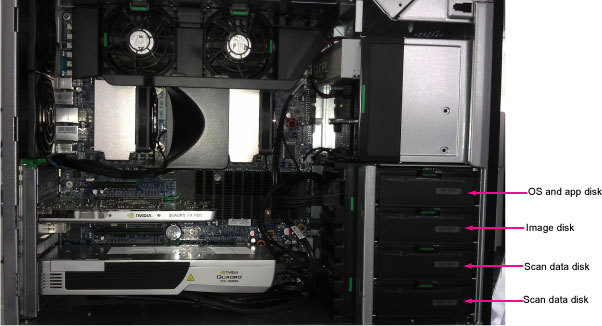
- Replace the existing scanfile hard disk drive (HDD) with new
one.
Figure 1. Scanfile Hard Disk Drive
- Reinstall the side access panel.
Finalization
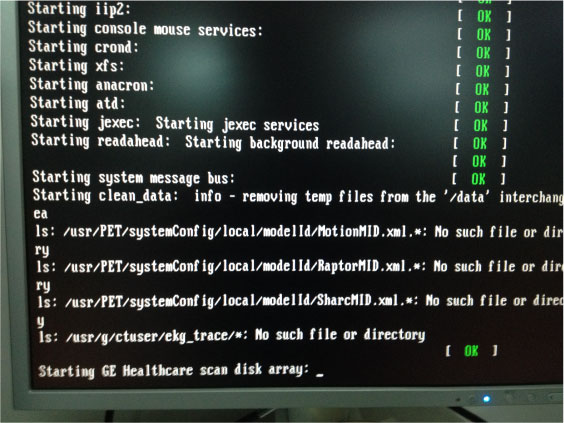
- Power ON the operator console, perform Shift + F8 command and press Enter key to skip scan disk array.
Figure 2. Power ON Console
- Run “Reconfig”, select “System”, select “Yes” under the “Regenerate Scan Database” and press “Accept”.
- Reboot system and type st to start up application.
- Open a shell window and type gre-raid -q command by root account, make sure RAID setup successfully.
- Do once Axial, Helical and Cine scan to test HDD performance, check image from image browse, make sure it worked properly.
- Reinstall the console covers.