- Topic ID: id_16158013
- Version: 3.0
- Date: Apr 9, 2020 8:49:36 PM
Gantry Tilt Regulatory Covers Removal and Re-Install
Prerequisites
Overview
1 Right Side Tilt Regulatory Cover Removal
Procedure
- Remove gantry side covers .
 danger
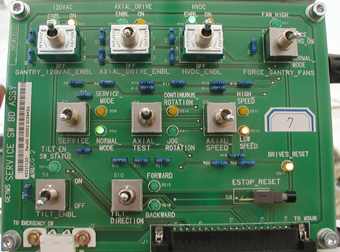
- Turn off axial drive enable. See Figure 1.
Figure 1. Service Switch Panel
- Tilt gantry backward to around -5.0 degrees.
- Disconnect the lower right front cover brace from the gantry front cover.
- Using a 6 mm ball-end hex wrench, remove four screws securing the cover to the gantry frame.
- Tilt gantry forward to around +18.5 degrees.
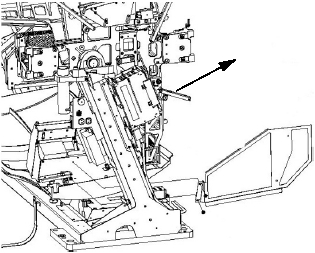
- Referring to Figure 2, carefully slide the panel out of position through the rear of the gantry.
- Reconnect the right lower gantry front cover latch
Figure 2. Right Side Tilt Regulatory Cover Removal
 |
2 Right Side Tilt Regulatory Cover Installation
Procedure
- Verify axial drive is turned off.
- Tilt gantry forward to around +18.5 degrees.
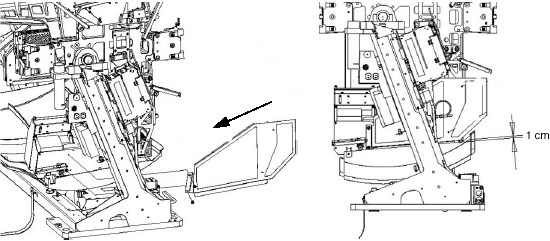
- Referring to Figure 3, carefully
slide panel into position from the rear of the gantry.
Figure 3. Right Side Tilt Regulatory Cover Installation
- Tilt gantry backward to around -5.0 degrees.
- Disconnect right lower gantry front cover latch.
- Loosely fasten two front screws, two lock washers, and two washers to the holes at the front edge of the panel (see Figure 3).
- Loosely fasten two rear screws, two lock washers, and washers to the new holes at the rear of the panel (see Figure 3).
- Assure that the clearance indicated in Figure 3 (1 cm) is met before final tightening of the four screws.
- Tighten screws.
- Reconnect right lower gantry front cover latch.
3 Left Side Tilt Regulatory Cover Removal
Procedure
- Verify axial drive is turned off.
- Tilt gantry to 0 degrees.
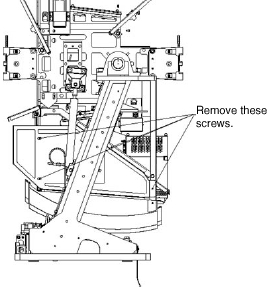
- As shown in Figure 4, remove
the four screws, four lock washers, and four washers fastening the cover to
the gantry HEMRC cover and the front cover angle.
Figure 4. Left Side Tilt Regulatory Cover Removal
- Remove the cover by sliding it through the rear of the gantry.
4 Left Side Tilt Regulatory Cover Installation
Procedure
- Simply reverse the installation procedure to reinstall the cover.
5 Finalization
Procedure
- Re-install gantry front and side covers.
- Turn on axial drive enable.