- Topic ID: id_16158039
- Version: 2.0
- Date: Apr 9, 2020 8:49:33 PM
Gantry Rotation Interference Touch Strip Replace
Prerequisites
Overview
This procedure describes the replacement of the Gantry Rotation Touch Strip.
Procedure
- Remove the following gantry covers:
-
Gantry side covers
-
Gantry top covers
-
Gantry front cover
-
- notice
- Turn OFF all three service switches (Axial Drive, HVDC, 120VAC).
- Disconnect touch strip cable.
- Remove gantry rotation touch strip.
Figure 1. Gantry Rotation Interference Touch Strips
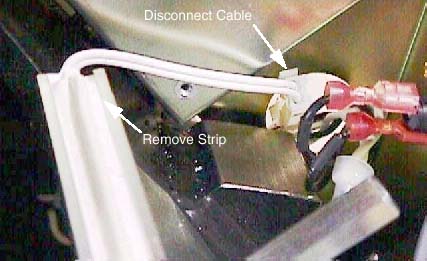
- Install new gantry rotation touch strip.
 |
Finalization
- Reinstall removed gantry covers.
- Ensure that all top cover connections are reconnected.
- Ensure that no cables are left in the rotating path.
- Return dollies to storage area.