- Topic ID: id_16157863
- Version: 2.0
- Date: Jun 10, 2020 2:45:28 AM
GDAS-16 Air Plenum Removal and Installation
Prerequisites
Overview
Remove Air plenum:
-
Rotate and lock gantry at the 12 O’clock position.
-
Disconnect fan power harness.
-
Remove air plenum.
1 Plenum Removal
Procedure
- Position the table to its lowest position.
- Remove the gantry right side cover.
- Position the gantry at 12 o'clock.
- notice
- Turn OFF Axial Enable, HVDC, and 120VAC switches on the Service Switch panel.
- Remove additional gantry covers as required.
Refer to
- Lock the gantry in position using the rotational lock.
- Unscrew four M6 screws, and remove the EMI shielding plate.
- Disconnect Fan AC power at Connector J22.
- Set air baffles on either end of the duct to the “Removal Position”
(see Figure 1):
- Loosen knurl nuts
- Slide baffle into position
- Hand tighten knurl nuts
Figure 1. DAS Air Plenum: Baffle & Mounting Bolts
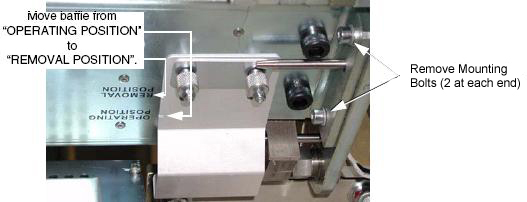
- Remove four (4) mounting bolts (2 at each end). See Figure 1.
- Carefully slide the plenum towards the front, without catching wires or Detector flexes.
- Set the plenum aside, on a clean surface.
- Continue with replacement procedures.
 |
2 Plenum Installation
Procedure
- Ensure that baffles are secured in “REMOVAL POSITION”.
Figure 2. DAS Air Plenum Installation
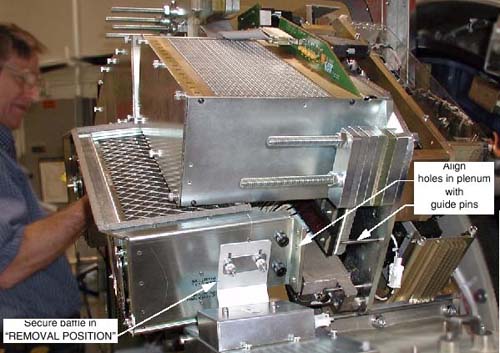
- Lift plenum into place, and align guide holes with guide pins.
- Slide plenum onto guide pins.
- Fasten plenum securely into place, using the four (4) M6 mounting bolts and four lock washers. Torque to 7.9 N-m (69.9 in-lbs).
- Fasten plenum securely into place, using the four (4) M8 mounting bolts and four lock washers. Torque to 38.4 N-m (28.3 ft-lbs).
- Return baffles to the “OPERATING POSITION”.
- Install the EMI shielding plate using four M6 screws, lock washers, and flat washers. Torque to 7.9 N-m (69.9 in-lbs).
- Connect Fan AC power at Connector J22.
- Remove rotational lock, restore power and reassemble gantry covers.
3 Finalization
Procedure
- Ensure fans are functioning properly.