- Topic ID: id_16157832
- Version: 2.0
- Date: Apr 9, 2020 8:47:15 PM
Axial Drive Module Replacement
Prerequisites
Overview
Procedure
- Remove gantry covers as required.
Refer to
 danger
- Turn off all 3 gantry service switches (Axial Drive, HVDC, 120VAC). Remove all system power at the Main Disconnect panel and use proper Lockout/Tagout procedures.
- Rotate the tube to the 3 o'clock position.
- Remove Axial Drive Module (ADM) cover by loosening the four (4) thumb screws.
- Using a flat-blade screwdriver, carefully loosen and fully remove the lock nut from the electrical connector. Push the lock nut and male threads along the cables clear of the ADM housing assembly. Do not attempt to remove these from the cables. This will allow cable removal later.
- Disconnect the control cable from the outside bottom of the ADM assembly.
- Disconnect the 3 phase VAC power connections at TB1 R, S, T. Write down colors for later reference.
- Disconnect the output PWM cable to the motor at TB1 U, W, V. Write down colors for later reference.
- Disconnect the Axial Dynamic Brake cable connections at TB1 DC+, DC- and TB3 24, 25. Write down colors for later reference.
- Disconnect the molex connection at the holding brake relay.
- Carefully remove the cables from the ADM cover using the slots provided. Carefully cut and remove tie-wraps as needed.
- Remove the six (6) M6 screws using the 4mm hex key. Four (4) screws are on the bottom and two (2) are on the sides. This will separate the ADM assembly, including the two (2) trapezoid shaped support brackets, from the main support bracket.
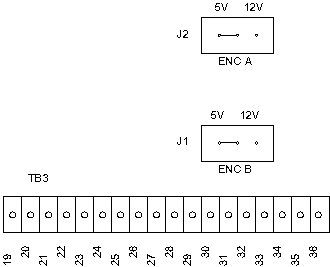
- Verify the two (2) jumpers are in the 5V encoder position on
the new ADM assembly (seeFigure 1).
Figure 1. Axial Motor Drive Encoder Board Jumpers
- Assemble in reverse order. Remember to replace all removed ty-raps.
- Restore system power, turn ON service switches and verify LEDs are illuminated on ADM.
- Reassemble gantry.
 |
Finalization
- Perform Axial Control Functional Axial Motion Checks.
- Perform System Scanning Test (located in folder).