- Topic ID: id_16157711
- Version: 3.0
- Date: Nov 27, 2020 2:13:01 AM
16 Slice DAS/Detector Troubleshooting with Crossover Tool
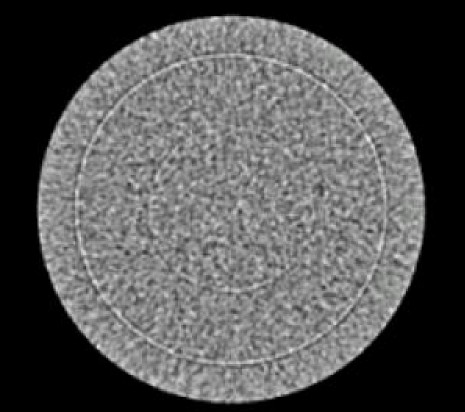
This troubleshooting procedure and associated Service Tool is designed to be used on systems using the interposer design. This includes all MDAS 16-slice and GDAS 16-slice systems. It is intended to be used to troubleshoot rings (Figure 2) and isolate problems between the rings and the DAS or Detector.
Figure 2. Typical Ring Artifact
1 Procedure
note: The tool will not work on a DAS that uses elastomers. (4 and 8 slice scanners).
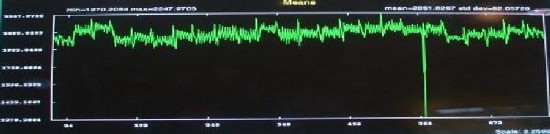
- Use DASTools to locate the bad/noisy channel. (See #id_16157711/SL1670886-1037085.)
Figure 3. DASTools Display of Typical Noise Spike
- Physically remove the flex from the bad/noisy channel.
- Physically remove the flex from an adjacent good channel.
- Install one side of the Channel Crossover Tool to the Detector.
- Install the other side of the Channel Crossover Tool to the DAS. (See#id_16157711/SL1670918-1037085 and #id_16157711/SL1670943-1037085.)
Figure 4. Channel Crossover Tool Installed
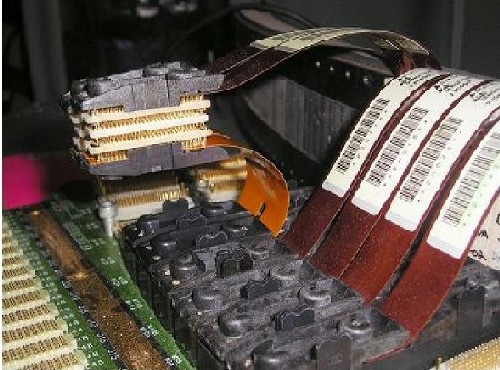
Figure 5. Channels Crossed Using the Crossover Tool
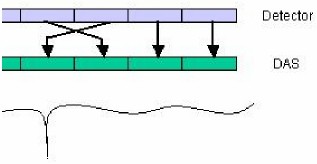
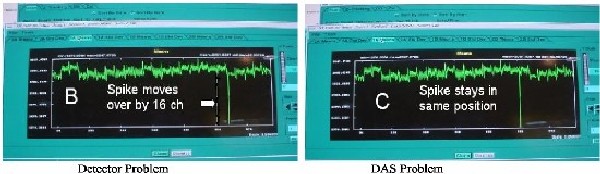
- Use DASTools to see if bad channel moved, or stayed the same.
- If the bad channel indication moved 16 channels, the problem is with the Detector
- If the bad channel did not move, a DAS issue is indicated. Isolate the DAS issue. See#id_16157711/SL1671041-1037085 and #id_16157711/SL1671046-1037085.
Figure 6. Display of Noise Spike in Original Data
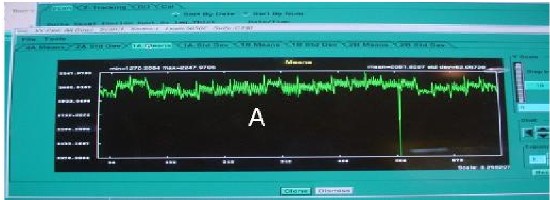
Figure 7. Results after Install of the Channel Crossover Tool
2 Finalization
No finalization steps.