- Topic ID: id_16158113
- Version: 1.0
- Date: Jul 7, 2018 4:25:18 PM
Artifacts Caused by Collimator Grease
Image Artifacts have been generated and reported on some CT systems due to the contamination of the bowtie and the primary copper filter. This contamination is from the lubricating grease used on the filter positioning drive screw assembly.
The following information may apply in general to all 46-296300G5, 2214768, 2214768-2 and 2214768-3 Collimators.
1 Inspection Process
The inspection takes less than 5 minutes. It consists of simply examining the Copper primary filter.
1.1 Required Tool
Bright Flashlight
1.2 General Inspection Procedure
-
Remove Mylar Scan Window
-
Launch Diagnostic Data Collection, DDC, from the Service Desktop.
-
Select DIAGNOSTICS.
-
Select DIAGNOSTIC DATA COLLECTION.
-
Select POSITION TUBE.
-
Enter 180 and execute.
-
Select STATIC X-RAY OFF.
-
Filter AIR.
-
Slice Collimation Largest Aperture, 4 x 5.00 for example.
-
-
Select ACCEPT RX.
-
-
Using a flashlight, inspect the primary copper filter by looking down into the collimator output port. See Figure 1.
note:The copper filter should be clean, dent and scratch free. Discoloration is acceptable.
If contamination is visible Figure 2, proceed to Cleaning Process.
Figure 1. Collimator Output Port
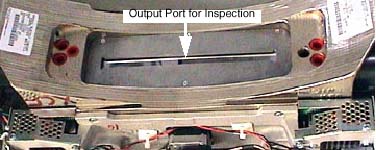
Figure 2. Extremely Contaminated Copper Filter

2 Cleaning Process
Click here to access Collimator Cleaning Procedure.
3 IQ Evaluation
Allow DAS and Detector to warm up for 1 hour.
-
Perform Fastcal, twice.
-
Evaluate Image Quality and ensure system meets specifications both numerical and visually.
Perform CT Number Adjustment if necessary.
4 Additional Information
Image Quality Testing may fail for one or more of the following reasons:
-
Tube Alignments were performed with contamination present.
-
Check and adjust tube alignments as necessary.
-
Perform Detailed Phantom Calibrations and CT Number Adjustment.
-
-
Detailed Calibrations were performed with contamination present.
Reload Phantom Calibrations from Saved State and perform Fastcal twice or perform Detailed Phantom Calibrations and CT Number Adjustment.
-
Beam Obstruction may be present on Tube Output Port or chamber between Tube and Copper Filter.
Remove Tube and Inspect this area for beam obstructions. Clean or replace parts as needed.
-
Component failure within the Image Chain in addition to the collimator contamination.
Troubleshoot accordingly.